
Updated May 16, 2023: Online safety is important, and that includes protecting your accounts from unauthorized access or abuse. Any program or website that requires or asks for login access credentials or information about yourself should be carefully considered before use. Complete account security is also your responsibility as well. To help us protect your KingsIsle accounts, please follow these simple guidelines.
If you notice unusual activity or have questions about your account, email help@kingsisle.com right away. This includes reporting any suspicious online behavior, such as someone pretending to be an official KingsIsle employee asking for account information on third party sites like Twitter.
When contacting us, make sure that your game account(s) have an updated and valid email address, and please use that address when contacting support. Please also note the username of the account.
Quick Checklist
- Official KingsIsle websites are wizard101.com, pirate101.com, eu.wizard101.com, and kingsisle.com.
- Carefully review any messaging that appears to come from KingsIsle to ensure the message is authentic!
- Do not buy Gold, Crowns Bundles, Subscriptions, Game Codes or Gift Certificates from any individual person online. Do not buy these items from any third party website unless it is explicitly mentioned by KingsIsle (such as Official Fansites, GameStop, etc).
- We will never request a Friends and Family payment option through PayPal. The only option that is officially used through PayPal is their PayPal Checkout service.
- KingsIsle Customer Support will only email from the above domains as well. Remember to hover over the sender’s address to make sure of the source.
- Pay attention to addresses that claim to be KingsIsle! We do NOT use @gmail.com (one exception being kingsisle.community@gmail.com), @email.com, @post.com, and other third party domains for ANY account communications.
- KingsIsle will NEVER ask you for your password! Anyone that asks for your password is clearly doing nothing more than trying to steal from you.
- Do not share your account information with anyone! This violates the Terms of Use and may result in your account being banned. It doesn’t matter how good of a friend someone may be; once you share your password, your account is at risk!
- While linking accounts is possible, it is ONLY for immediate family members, not for friends. Linking accounts with people not in your household leaves your account exposed to being compromised.
- Use a unique username/password combination for every account you own.
- Do not let others use your computer or mobile device unless you explicitly trust them. Even if you do, you are responsible for their behavior if they access your game accounts.
- Use 2FA (Two-Factor Authentication) on all platforms where possible. We are looking into the possibility of incorporating it into Wizard101 and Pirate101 but this is uncertain and still being investigated.
- Anyone that asks you to download a program or app to cheat at a game is cheating you and they may be stealing more than just your account information.
- If it seems too good to be true, it’s probably an exploit or fraud. Don’t fall for it because it may cost you your account, characters, pets, and all your other hard-earned items.
- When using Discord or any third party websites, be careful about clicking on links you do not trust! Any click of a link sent by a scammer may result in a keylogger or hack program to be placed on your computer. Do not click on links if you don’t need to!
Best Practices In-depth
Never Share Your Password with Anyone
Some dishonest people online may seek to gain control of your game account by offering to give you Crowns or in-game items if you share your account with them. To keep all of our players’ account safe, it is against the Terms of Use to share your password with anyone. If you do this, you will lose your account forever, and that’s no fun! Always remember, KingsIsle employees will never ask for your password.
More information about the dangers of account sharing that applies to all our games can be found in this helpful video from Wizard101 Help and Support.
Protect Your Identity Online
It’s fun to make friends online, but personal information isn’t always appropriate to share. Parents should discuss with their children the types of information that shouldn’t be shared online, such as home address, phone number and full name.
It’s easy to ensure your child’s interactions within Wizard101 and Pirate101 are safe by using the various chat settings available. Please also ensure that their mobile devices are secure for any mobile games they access. The safest version available for young players is Menu Chat, which allows player to use preselected phrases to communicate. To access your account chat settings visit “My Account” and then “Parental Controls” on the Wizard101 or Pirate101 websites. Learn more about the various chat settings in our Players Guide.
Look Out for Impostors
Some people online may attempt to access your game account or personal information by pretending to work for KingsIsle. If you need confirmation or help, please contact customer support at help@kingsisle.com. KingsIsle Customer Support will never reply back to your email or send you emails directly from any domain other than Kingsisle.com.
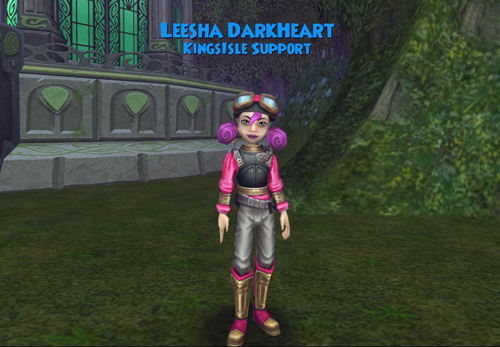
For example, we will never email you from gmail.com or yahoo.com. Also, KingsIsle will never ask for your whole credit card number, expiration date, or pin code. In game, KingsIsle employees have a special KingsIsle Support badge. If any player claims to work for KingsIsle but is not able to show you this badge, do not believe them as they may be an imposter.
Illegal Gift Codes
Sometimes gift codes are offered in various unofficial forums and chat groups that are illegitimate. We have enabled detection measures to identify suspicious activity and disable such codes. We will remove any benefit gained from the use of such codes.
If you ever have a question about the legitimacy of a sale, contact Customer Support through Wizard101.com or Pirate101.com. It’s best to either purchase prepaid cards from legitimate businesses (like Target or Walmart) or buy them online from Wizard101.com or Pirate101.com.
Watch Out For ‘Generators’ and ‘Spoofing’
There is distributed software that claims to be “Account Generators” or “Crown Generators”. This software is malware. Embedded in the code of these programs are hidden tools that will compromise your account and possibly even your computer! Do not trust these programs.
If you receive an unsolicited email from an email address that appears to be from KingsIsle, make sure you roll your mouse over the email address and/or select it to make sure this isn’t a “spoofed” email address that is actually coming from someone other than KingsIsle. Sometimes the sender name can read “help@kingsisle.com” but the real email address can be something completely different.
Never give anyone your password, even to us! KingsIsle will NEVER ask for your password. That’s a giveaway that you’re not talking to someone from KingsIsle.
If it sounds too good to be true, it probably is. Though we love to give our players codes for free items and hold fan site contests, KingsIsle Support wouldn’t send you a $60 gift certificate code as a mistake, then retract that offer, and then offer it to you again in exchange for personal information like passwords and credit card numbers.
Following the tips above is a great place to start in keeping your account and personal information safe while playing KingsIsle games. Practicing good judgement online is important for players of all ages. For parents looking to learn more about general online safety for their children, Google Safety Center is a great resource.
If you notice anything suspicious or have any questions about your account, please email help@kingsisle.com right away. Makes sure that your game account(s) have an updated and valid email address, and please use that address when contacting support.
Thank you for keeping your accounts safe and being wise to petty thieves on the Internet!

Join us at PAX South this coming weekend from January 19-20, 2019! KingsIsle Associate Producer Renee Wooten and Senior Community Manager Mathew Anderson will be arriving on Saturday and hanging out with the community through the weekend. While we will not have a booth, look for one of us wearing a KingsIsle t-shirt, or you can contact a fellow community member you know will be in attendance! You can also email us at community@kingsisle.com.
KingsIsle Capturing the Instagram Magic
 The community has a bunch of fun plans at PAX South for those tuning in on social media (keep watch on Twitter and Facebook for updates here), but our team also has something special that we’re kicking off this week. Ever heard of a fun social media site called Instagram? Have we ‘captured’ your attention yet? Thought so!
Be sure to follow our new Instagram account, www.instagram.com/kingsisle, for photos and videos posted from our adventures with the community during the show.
Follow Us and Win!
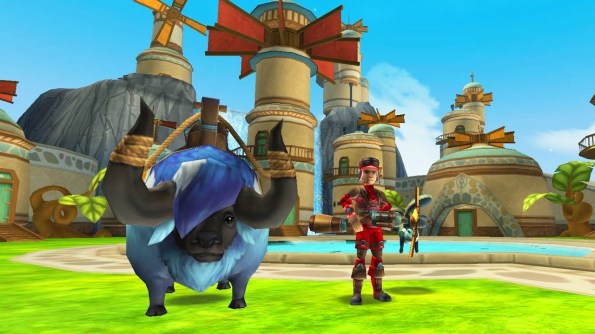
For everyone that follows our account and likes an Instagram post during the show, you will be entered into a drawing on January 21 for a chance to win 1 of 8 10k Crowns codes for Wizard101 & Pirate101! Also, if you leave a comment and tag a friend, we’ll enter you in a drawing for the chance to win an Aero Plains Bundle! Each post that you like and/or comment on will count as an entry. The more you like and comment on our posts, the greater your chances of winning.
Jan. 22 Update: Winners have been announced! Congrats to Instagram users karapantoflas_andreas, alexa_grigorian, afoxauthor, epeaslee9854, snappedlegend, emo_nellz, tina.georgieva10, and charitonidis_konstadinos! Also congrats to peasleekathy for winning the Aero Plains Bundle!
Please email at community@kingsisle.com your account name and confirm your Instagram name.
See you at PAX South!
Welcome to mythical island, a new biome in Animal Cove that’s packed with fun surprises and all new activities to explore like Magical Gardens, Mythical Homes, and much more! Read on to learn more about all things Mythical Island.
Mythical Island
There are two ways to unlock Mythical Island, a brand new biome. Mythical Island is unlocked when you beat level 75 or when you rescue your first mythical baby animal, whichever comes first. When you unlock Mythical Island, you’ll trigger a special cutscene.

To access mythical island at any time, scroll down from the docks.
Mythical Gardens
Calling all green thumbs! Mythical Island is home to five all-new mythical garden plots. When you first enter Mythical Island, these plots are locked. You can tell which garden plots are locked from the giant padlock icon that floats above them. To unlock your plots, you’ll have to use keys.
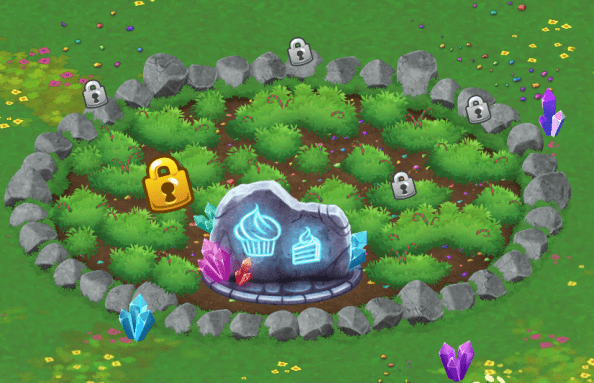
Simply tap on the golden padlock, then hit the unlock button at the bottom of this screen to unlock your plot with keys:
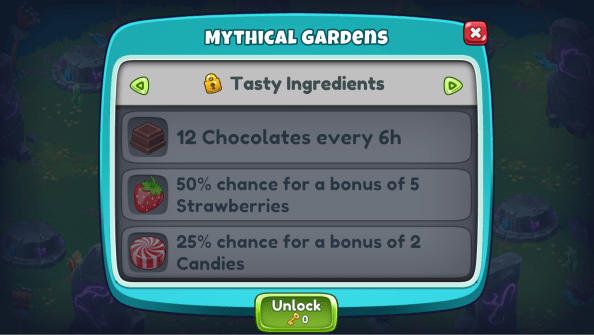
Luckily, you don’t need to have real life gardening skills to reap a fantastic harvest from these gardens! All you have to do is unlock the plots. Once you do, your garden will automatically start growing. Each mythical garden plot will always grow one common item and has a chance to add additional rare and epic items to your harvest. Each plot will grow different items than the plot you unlocked before it, so it’s worth it to unlock all 5 plots!
Gardens grow on a timer system. Plots that are ready for harvest will have a checkmark icon instead of the stopwatch icon.

Magical Ovens
You may have also noticed these strange contraptions while exploring Mythical Island:
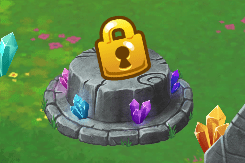
They’re platforms for Magical Ovens, and they’re the perfect way to make a tasty treat. Just like the magical garden plots, these Magical Ovens are initially locked. You can tell which Magical Overs are locked from the giant padlock icon that floats above them. To unlock your Magical Oven, you’ll have to use keys.
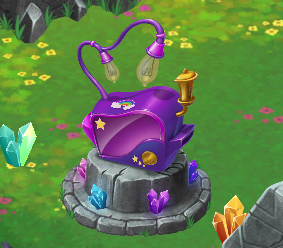
Once you’ve unlocked your first Magical Oven, you can combine the items you’ve harvested from your magical garden into special new items, like the chocolate covered strawberry (created by combining… you guessed it, one chocolate and one strawberry). Items do not automatically combine when they enter your inventory; you’ll have to tap the Magical Oven, then the recipe you want to make to start the Magical Oven timer.

Once you see the green checkmark floating over your timer, your newly combined item is ready to collect! Like with gardens, you can use coins to speed up that timer. Magical Ovens also have two upgrades that you can get with keys: one that allows you to speed up the Magical Oven timer and one that increases the chance that you’ll create 2 of your combined item instead of one! Just click the Upgrade button at the bottom of the Magical Oven menu to upgrade your Oven:

Mythical Homes
Mythical Island has five Mythical Runes that you can only unlock by unlocking Mythical Baby Animals.
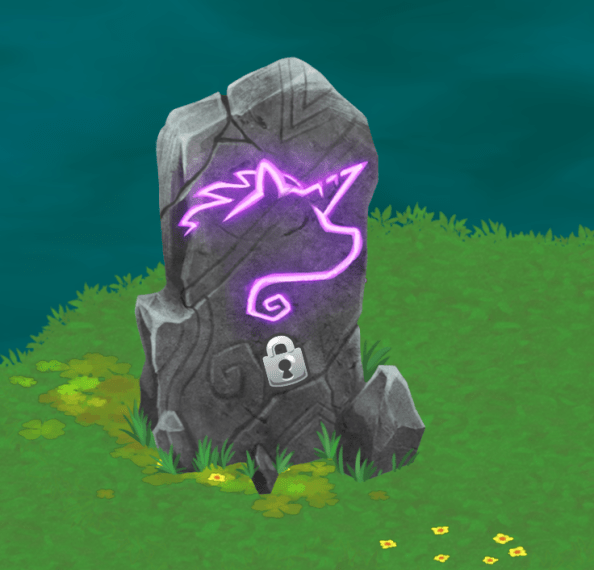
Each rune unlocks when its associated Mythical Baby Animal is rescued and delivered to the Mythical Island. When the Mythical Baby Animal is delivered, it will transform the rune into a fantastic habitat that’s perfect for its Baby Animal!

As soon as you unlock a Mythical Home’s Baby Animal, it will start producing a special rare item to help you complete the biggest reward on the Tasty Treats Menu (more on that later). Each station automatically produces one particular item, unlike the magical gardens. For example, when you rescue Twinkle Star, her mythical station will unlock and immediately begin generating Rainbow Sprinkles.
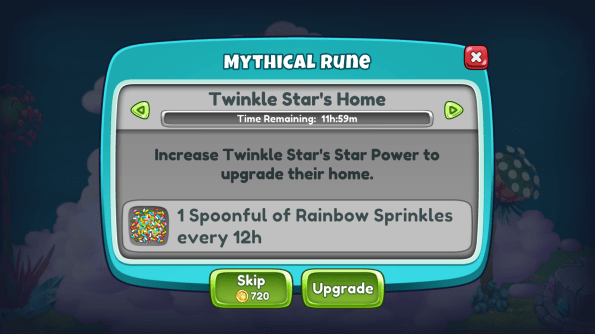
Mythical Homes are on a timer system, just like mythical gardens and the Magical Ovens. Once the timer is completed, you’ll see a checkmark above the Mythical Station instead of the stopwatch icon. After you tap on the station to collect the items, the Mythical Station will automatically start generating its item again.
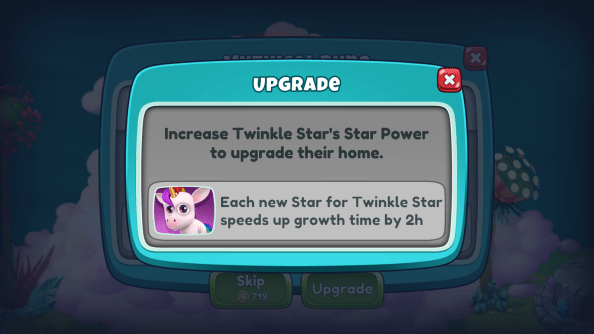
Mythical Homes are upgraded by powering up your mythical baby animals and each upgrade reduces the time to harvest items from the Mythical Home by two hours. For example, if Twinkle Star has two star power in your game, you’ll be able to harvest items from her Mythical Home two hours faster.
The Tasty Treats Menu
These Mythical Baby Animals have a sweet tooth, and they need your help to satisfy them! As soon as you unlock Mythical Island, you’ll unlock the Tasty Treats Menu. Scroll over to Mythical Island and you’ll find the Tasty Treats Menu in the center of the Mythical Gardens.
When you tap on the Tasty Treats Menu, it will bring up this menu, which has 3 tabs: Orders, Inventory, and the Mythical Island Shop.
Menu
The first tab is the Menu tab.

This is the tab that opens whenever you tap on the Tasty Treats Menu, and it’s where you can find orders to complete. Each order has a series of items that you need to collect or create to turn in and receive the reward listed.
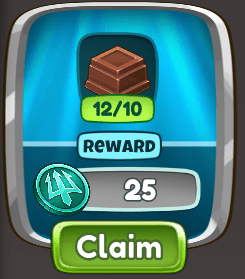
If you have all the items needed to complete a job, simply tap the “Claim” button. When you do that it will deduct those items from your inventory and you will receive the job’s reward! If you don’t have the items needed to turn in a job, the “Claim” button will be grayed out until you collect the necessary items.
Ingredients
To see what items you have and how many of them you have, tap the tab with the backpack icon to go to the second tab of the Tasty Treats Menu .

This tab is your Inventory. The number below each ingredient icon indicates how many of each ingredient you have.
The Mythical Island Shop
When you complete a treat on the Tasty Treats Menu, you’ll receive Trident Coins. These coins are exclusive to mythical island and are used to unlock items in the Mythical Island Shop, which is the 3rd tab of the Tasty Treats Menu menu.

This all new shop is where you use that/those exclusive Trident Coins. It’s packed with new island decorations, character outfits, and non-mythical baby animals that you can only get using Trident Coins. You’ll also be able to purchase Mythical Baby Animal Token Bags with Trident Coins!
Now that you’ve got all the information, what part of Mythical Island are you most excited about? Let us know in the comments below!
We’re packing the holidays with all sorts of treats for the community, starting today with a kickoff of the 12 Days of the Spiral event! Throughout the 12 days we will be revealing giveaway items, an art contest, and other fun stuff we can’t wait to share.
Follow Wizard101 and Pirate 101 on Facebook and Twitter (@Wizard101 & @Pirate101) or check the official 12 Days of the Spiral website for daily announcements.
Day 1 of the 12 Days of the Spiral
Day 1 is all about giving back by bringing back two retired charity mounts: the Noelephant and the Bah Humbug! You’re sure to spread holiday cheer wherever you go when you ride these mounts through the spiral.
Best of all, every Noelephant and Bah Humbug purchase goes to two great causes! Net proceeds up to $50,000 will be split equally between our amazing charity partners, Creative Action and Children’s Health.


Creative Action
 Storytelling, art, and creativity are at the core of what we do at KingsIsle. One of the biggest goals when Wizard101 was first created was to provide a safe space for children and families to come together, explore, and to spark their imaginations. Creative Action provides those opportunities in the real world, and we couldn’t be prouder to partner with them!

The mission of Creative Action is to spark and support the academic, social and emotional development of young people, and they do this through interactive classroom performances, after-school arts residencies, and community-based programs in Central Texas. They believe that when youth develop their creativity, compassion, confidence and critical thinking skills, and build meaningful connections with peers and positive role-models, they become successful adults who contribute to their communities and thrive in their careers and relationships.

Creative Action provides incredible programs for all ages that focus on performance, technology, art, and so much more. They empower and educate youth through the transformative power of creative expression, social and emotional learning, and social justice education.
For more information about Creative Action visit www.creativeaction.org.
Children’s Health
 Children’s Health℠ is the eighth-largest pediatric health care provider in the nation and the leading pediatric health care system in North Texas, providing a full spectrum of health care services—from daily wellness and primary care to specialty visits and critical care. Holding eight disease-specific care certifications from The Joint Commission, Children’s Health has been consistently named one of the nation’s top pediatric providers by U.S. News & World Report.

Here at KingsIsle Entertainment, we believe that gaming can lead to some truly incredible outcomes and connections, and Children’s Health provides it as one of the many activities that they use to bring patients and families together! It seemed like a natural fit to partner with a charity that is so dedicated to making life better for children.

According to Children’s Health, “Gaming is the number one requested activity by Child Life staff as it is an activity that both boys and girls and patients of all ages can engage with. It’s a conversation starter between patients that don’t know each other and allows parents to connect with their kids outside of the hospital bed.”
For more information about Children’s Health, visit https://give.childrens.com/about-us
More 12 Days of the Spiral
Want to see what other surprises we have in store for the 12 Days of the Spiral? Be sure to follow Wizard101 and Pirate 101 on Facebook and Twitter (@Wizard101 & @Pirate101) for daily announcements!
To celebrate Wizard101’s 10th Anniversary, we created a special video series all about the game and what goes into it. We interviewed employees from a variety of departments and gave you a behind the scenes look into the game.
Of course, one of the most important parts of our game is the community that helped us get where we are today! That’s why we dedicate this final Wizard101 10th Anniversary video to you, the community! Thank you wizards for a wonderful 10 years in the Spiral. Here’s to 10 more years of exciting adventures!
You can catch the video on our YouTube channel or right here:
Miss out on the other videos in this series? Catch them here!
We’re so thrilled to have a strong and vibrant community, and we love hearing from you. Let us know what your favorite moments were from this series or other videos you’d like to see in the comments below!


 KingsIsle Blog