
Animal Cove’s latest update is improving how we handle your in-game Player ID. To provide players the greatest chance at getting the name they want for their general gameplay experience, we’ve split up your story name and your Player ID. Read on to learn more about the differences between the two!
Your Story Name
When you first start the game and play through the cut scenes, you’ll be asked your name.
![IMG_1691[1].PNG](https://kingsisleblog.com/wp-content/uploads/2018/11/img_16911.png?w=595)
This is your story name. It’s the name that Winston and all of the other inhabitants on your island will call you by. Previously, your story name also served as your Player ID which meant that there could only be one person with that name in the system. If the name “Jane Doe” was already taken in-game, anyone named Jane Doe in real life would have to use a variant or go with another name.
With the latest update, your story name can be anything, even if another player is already using it. Nobody else can see this name other than you as you play the game. Existing players can update their in-game name at any time by navigating to the settings menu, then clicking Edit Profile.
![IMG_1694[1].PNG](https://kingsisleblog.com/wp-content/uploads/2018/11/img_16941.png?w=595)
This will bring up the following page, where you can update you Story Name and your player icon:
![IMG_1695[1].PNG](https://kingsisleblog.com/wp-content/uploads/2018/11/img_16951.png?w=595)
From there you can change your story name, which will NEVER change your Player ID.
Your Player ID
Your Player ID for the Leaderboard event and the Club system is now separate from your story name. The Player ID serves as a unique ID for global events, which means that only one person can use a particular name. If a Player ID (not a story name) is already in use by another player, you won’t be able to use it and will have to choose something else for your Player ID. You cannot change your player ID once it is set. Please choose something that is easy for your friends to search for you by!
You can set up your Player ID at any time by opening the settings menu, then clicking on “Create a Player ID” at the top of the menu.
![IMG_1692[1].PNG](https://kingsisleblog.com/wp-content/uploads/2018/11/img_16921.png?w=595)
When you unlock the Leaderboard event at level 45, you’ll be prompted with this menu to set up your Player ID if you haven’t done so already:
![IMG_1693[1]](https://kingsisleblog.com/wp-content/uploads/2018/11/img_16931.png?w=595)
If you exit out without setting up a Player ID, don’t worry! You’ll be prompted with the same menu each time you click the leaderboard event icon on the main game screen.
Note: the game will still track your Leaderboard event progress but you won’t get your rewards or show up in the rankings until you set your Player ID. If you set up your Player ID in the middle of a Leaderboard event after playing a few levels, the progress you made while playing those levels will count towards the Leaderboard event that’s live when you set up your Player ID.
If you haven’t set up your Player ID and unlocked the Club system at level 50, you’ll be prompted with this menu to set up your Player ID if you haven’t done so already:
Just like with the Leaderboard event, you’ll see that prompt every time you click on the Club icon until you set up your Player ID.
If you have any questions about this system or any other systems in the game, we’d love to answer it here in the comments or through our usual support and social media channels!
At KingsIsle we are all about the community. You are what makes the games we develop a reality and worth working on! It especially excites us to discover and be able to share content you develop for these games. A smile is brought to our face by every piece of fan art and drawing that comes across our screens.
We have seen some great questions on what type of content we can share. Content ranges from a unique screenshot of your character in the world, concept art and drawings of a world element (usually this is again about your character), a useful gameplay guide, an event that’s coming up such as a birthday party or PvP match, and of course instructive livestreams and other videos.
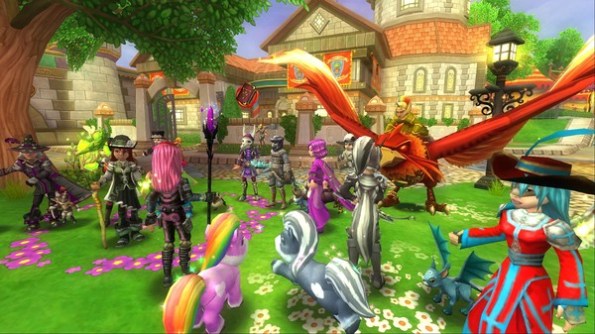
Some content we cannot share. This content ranges from the obvious, such as political commentary and abusive language or hate speech, to the simple matter of how that content is presented. The higher the quality and care in crafting your content, the greater the chances it will be shared!
There are a few ways that we share community content that may be of interest to you.
Passive Notices
Usually we will discover content simply by running across it when we check social media pages. Use @Wizard101, @Pirate101, and @AnimalCove on Twitter and Facebook when you want us to see your posts. You can also share more with the rest of the community by using the hashtags #Wizard101, #Pirate101, and #AnimalCove. We check those too!
Other areas that you post, such as in the Comments section of news announcements, replies to forum posts, etc., are sometimes noticed as well. Please know that we don’t always have time to check over every single community specifically for content to share, so it’s quite possible some of your content will go unnoticed.
Direct Contact
This is where a more direct approach helps in ensuring we see your content you wish us to share. If you’ve got the best drawing this side of the Spiral, or an amazing screenshot or video, please send it to us at community@kingsisle.com, or PM us on one of our game’s social media channels.
If your content isn’t shared, don’t worry, we may just not have seen it yet, or we will get to posting it at a better time. It’s also possible that some element in the content caused us to not be able to post it. Even the timing of fitting it into our daily news schedule can matter.
Official Fansites
Then there are the outlets that regularly put out content. You can probably name one or three off the top of your head, as there are so many great community fansites out there! Some of these fansites are part of KingsIsle’s Wizard101 and Pirate101 official fansite programs. The way fansites are included (or removed) from the program is a combined review of the quality and frequency of their content, history in the community, and a variety of other factors.
Applications are currently open for fansites to request being added to our program!
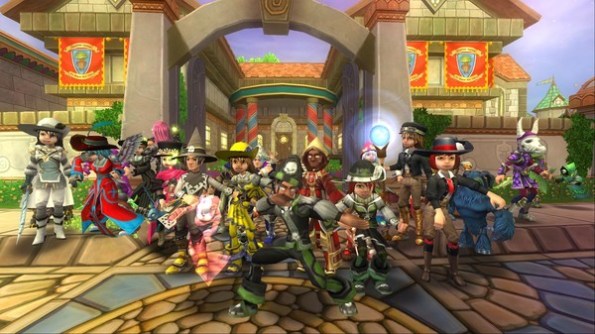
Share away, wizards and pirates and animal lovers, as we want to see what great community contributions and fun content you’ve come with. It may even make it into our monthly newsletters or on the next KI Live!
The Animal Cove team is incredibly excited to bring you a brand-new way to socialize and connect with your friends in-game: Clubs. Joining a Club will allow you to chat with your fellow club members, work together with them to unlock special Club items, and much more! We’ve created this handy guide to help you get the most out of Clubs.
Joining or Creating a Club
In order to join a club, you must set up your Player ID if you have not already done so and beat level 50. Once you unlock clubs, you’ll get a special pop up that will take you to the Club menu.

This menu is where you can create a club of your own or simply join an existing club. Clubs currently have a max limit of 25 members. Once that limit is reached, no new members can join the Club until someone leaves or is removed from the club.
Joining a Club
To join a club, tap the club icon in the top left corner of the main game screen.

That will bring up this menu:

If you haven’t set up your Player ID, you will be prompted to set your Player ID when you click the Club icon. You cannot join a club until you set your Player ID.
The menu will show all of the Clubs that have at least one slot open for New Members. Want more options? Just hit the Refresh Button in the top left corner of that menu. You can also search for Clubs if you know the specific name of the Club you want to join. Simply hit the “Search” button at the bottom of the list.
Once you’ve found the club you want to join, hit the view button to see details about the club like the Club Leader, Club Officers, and Members.

Hit the join button at the bottom of that page to join the club.
Creating a Club
Starting a Club of your own is simple. Tap the club icon at the top left corner of the main game screen, then hit the Create button at the bottom of the club list.

From there, you’ll be able to choose a Club Avatar and a Club name. Clubs default to “open” membership, which means anyone can join your club.
Creating a club has no cost but you can only own one Club at a time.
Club Leadership
Clubs have two levels of leadership: Club Leader and Club Officers. Club Leaders and Officers have options that are unavailable to the other members of their club:
- Club Bulletin: Club Leaders can set a message for the Club that will appear at the top of the Club Chat.
- Club Options: This menu allows the Club Leader and officers to control and edit Club Access. They can promote, demote, and kick out other members and Officers. The Club Leader also has the ability to promote a new Club Leader, which Club Officers cannot.
Club Chat
General Chat Options
The Club Chat is our new way of connecting you with your fellow club members. To open the club chat, tap the Club icon. The Club chat is the first tab of the Club menu and looks like this:

Players can requests lives using the heart button (more on that later) or send a message by clicking on the button with the speech bubble, both at the bottom of the club chat screen.
Weekly Club Challenge
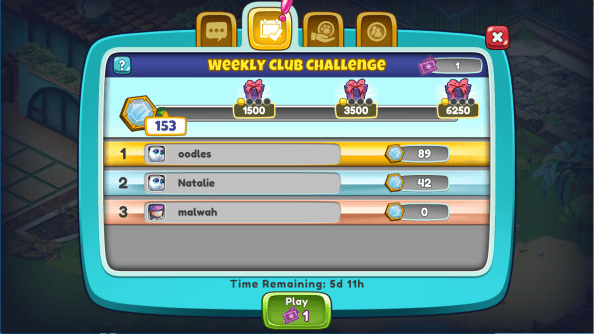
The second tab of the club menu is where the Weekly Club Challenge lives. Tapping on the second tab will open this menu:
Club Tickets
Every day you play during the weekly Club Event, you get a club ticket to play a special level that will help you earn those club points. VIPs get two daily club tickets instead of one, which is just one of the many benefits of VIP status.
One important thing to note: these tickets do not stack. That means that you have to use the daily club tickets you earn before you can get another daily ticket rewarded to you.
Are you out of daily club tickets but want to keep helping your club earn rewards? You can play more special Club levels by paying coins.
Special Levels
To redeem your daily Club Ticket and play special new Club Levels, click the Play button at the bottom of the Weekly Club Challenge screen:
In the Weekly Club Challenge levels you’ll be given a certain number of turns to collect as many Club Gems as possible. Collecting Club Gems is just like collecting coconuts: making a match next to the Club Gem pieces will collect them.

One Club Gem collected equals one club point earned that will count towards your club’s weekly event total. You will not be able to extend the number of turns at the end of the level like you normally can, so make the most out of the moves you have!
Event Progress
During the weekly club challenge, every Club Point that members of a Club earn are tracked and unlock prizes for the entire club. To see both the time remaining in the event and your Club’s progress, navigate to the Weekly event menu, then check out the progress bar at the top of the screen:

Tapping on any of the present icons in the progress bar will show you the prizes your Club will receive once your club collects that many Club Gems.
Leveling Up Your Club
How to Level Up Your Club
Players who are in a Club can help level up their Club by donating coins. To donate coins to your club, tap on the 3rd tab of the Club Menu, then hit the Donate button at the bottom of the page:
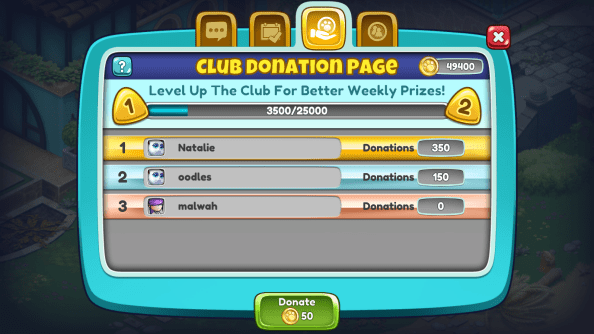
Benefits of Leveling Up
Leveling up your Club unlocks two main benefits: new and better Club prizes in the weekly Club events and the ability to purchase new and exclusive items in the Club Shop.
The Club Shop
What is the Club Shop?
The Club Shop is a new store with exclusive items that you can only purchase with a new currency: Social Points (more on those in just a bit). The Club Shop is on the 4th tab of the Club Menu:
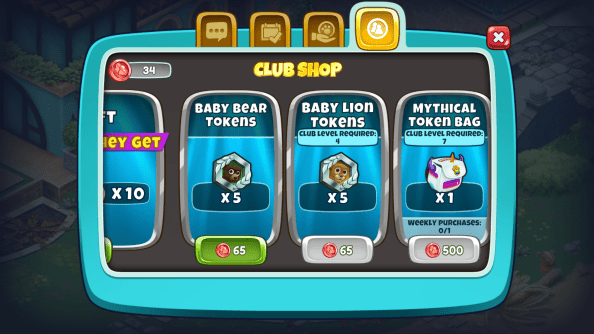
Social Points
Social Points are the new currency to buy items in the Club Shop. There are 3 main ways to earn social points that you can spend in the Club Shop:
- Collecting Club Gems: For every Club Gem you collect in your daily Club Level(s), you earn a social point.
- Responding to Club Requests: Club members can now directly request Hearts every 6 hours from their fellow Club Members. This will send a message to the club chat that will disappear once three club members have responded. Responding to these messages will give you social points. You can only send one heart per each request.
- Purchasing Certain Items from the Coin Shop: This update brings a brand new item to the Coin Shop: the Club Gift. When you purchase a Club Gift through the Coin Shop, you get the items included and every other member of your club will also receive some items. If a member of your club buys a Club Gift, you’ll get a pop-up where you can see who bought it and redeem your items. As an added bonus, you also receive social points for purchasing Club Gifts!

If you leave a club, the social points you’ve earned stay with you; however, you cannot spend your social points until you join another club.
There are a lot of new aspects to the Club system and we hope that this makes things a bit clearer for you. What part of the new update are you most excited about?
Here at KingsIsle we love Baby Animals. In fact, we love them so much that we updated Animal Cove’s Baby Animal system and added a brand new Baby Animal Challenge! This update is pretty different from the Baby Animal events you’re used to seeing, so we’ve created this handy guide to all things Baby Animal!
Baby Animal Rescue Event
Baby Animal Rescue is a weekly event that you can play if you’ve reached level 45 in the game.

Completing each level in the event will award you one, two, or three tokens of the Baby Animal you’ll be rescuing. Once you reach 10 tokens, you’ll be able to rescue the Baby Animal if you’ve unlocked the biome that the Baby Animal lives in.
One important thing to note: getting all of the tokens doesn’t automatically rescue the Baby Animal. You’ll need to open the collectibles menu at the bottom left side of your screen.

Next, navigate to the Baby Animal tab. If you have a Baby Animal that’s eligible for rescue, the Baby Animal tab will have an exclamation point to notify you. The baby Animal that you can rescue will also have an exclamation point indicator by their icon.

Click the Baby Animal with the exclamation point by its icon. That will bring up this menu:
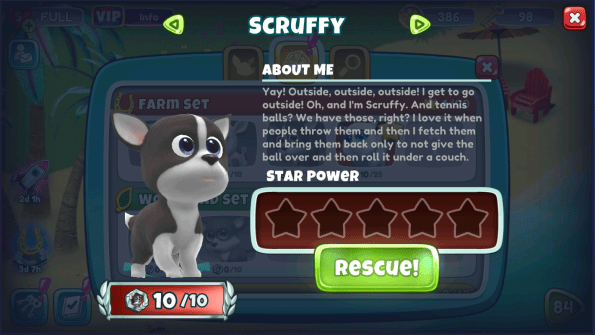
Hit the large green Rescue! Button and you’ll unlock the rescue cutscene for that Baby Animal. After that, you can find your Baby Animal wandering around in their associated biome.
You may have noticed that the Baby Animals are now grouped into sets. There are currently four sets of Baby Animals: the Farm Set, the Woodland Set, the Safari Set, and the Mythical Set. We’ll explain why that’s important later in this blog post when we dive deeper into the Baby Animal Challenge Event.
One important thing to note: each Baby Animal lives in a specific biome. If you haven’t unlocked that biome yet by playing through the story, your new Baby Animal won’t have anywhere to live! You can still earn tokens from the Baby Animal Rescue Event, but you won’t be able to actually rescue them until you unlock their biome.
Already rescued all the Baby Animals? You can still earn tokens during Rescue Events for the Baby Animals you’ve previously rescued that you can use to power them up!
Star Power
Powering up your Baby Animals gives you Star Power for that animal’s set. For example, I rescued Fluffy (the adorable kitten) during the last Rescue Event. As you can see, Fluffy’s got one star power:
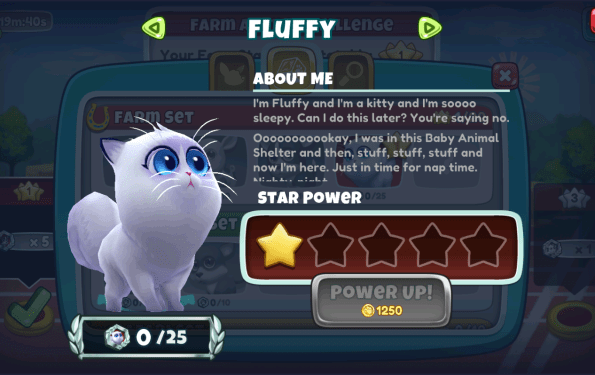
Star Power is what helps you unlock levels in the brand new Baby Animal Challenge. For more on that, read on!
The Baby Animal Challenge
When a new Baby Animal Challenge begins, you’ll see this icon on the left side of your screen if you’ve reached level 45 or higher:

When you click it, it will take you to the main Baby Animal Challenge screen:
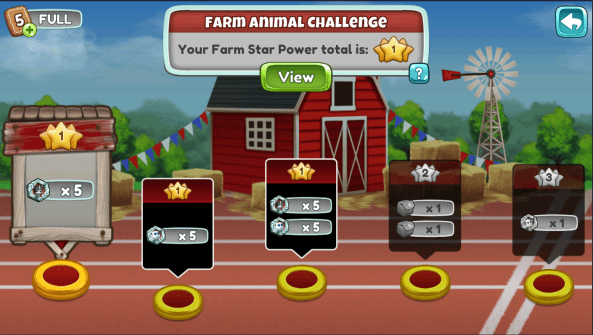
At the top of the screen, you’ll see which challenge you have (Farm, Woodland, or Safari). Those little floating call outs tell you how much Star Power you need to play the level and how many Baby Animal Tokens you’ll earn when you complete the level.

You may have noticed that some of the levels are greyed out. That means that I don’t have enough Star Power to play them since I’ve only got Fluffy and Fluffy only has one Star Power. Now, say I had two Baby Animals in the Farm Set (Fluffy and Billy), both with one Star Power each. I’d be able to access the first 4 levels of the Baby Animal Challenge, not just the first 3. If I powered up Fluffy to two Star Power and had Billy with one Star Power, I would have access to the first five Baby Animal Challenge levels.
Each Baby Animal Challenge has 15 levels in total for you to complete, and you can swipe left to scroll through them and see the rewards that await you in the later levels.
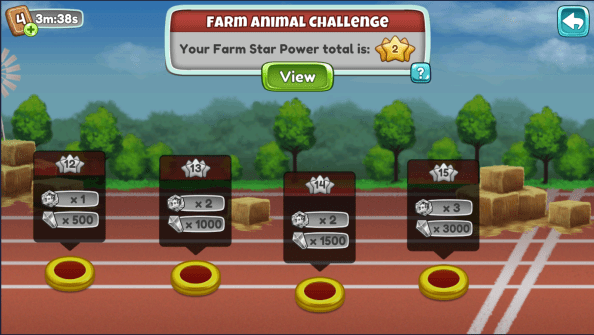
If you don’t have enough star power to get all the way to level 15, don’t worry! It’s not a bug or a glitch. The more Baby Animals you rescue and power up in Rescue Events, the further you’ll be able to get in the new Challenge Event. As an added bonus, playing the Baby Animal Challenge levels reward you with tokens that you can use to increase your Star Power. The later levels reward you with special tokens to help you unlock a Mythical Baby Animal, so you’ll definitely want to play through all 15 levels!
Don’t want to wait until the next Rescue Event to be able to complete the Baby Animal Challenge? You can visit the Island Shop and purchase Baby Animal tokens to unlock the next levels.
Purchasing Baby Animal Tokens
During Baby Animal Rescue and Baby Animal Challenge events, there are new Token Bags available for purchase in the Island Shop.
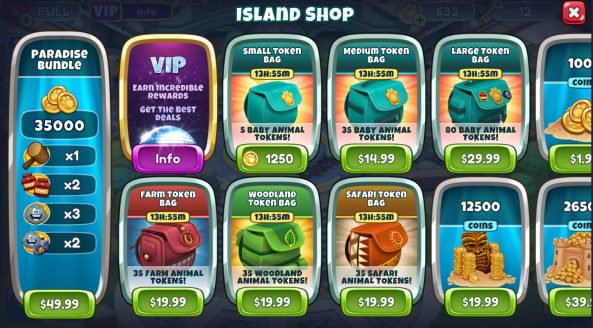
Here are a few important things to note about these Token Bags:
- All Token Bags are randomized. There is no guarantee that you will get the exact tokens that you need to increase your star power and unlock more levels of the Baby Animal Challenge.
- The Small, Medium, and Large Token Bags will give you random tokens from all sets. That means you have the chance to get tokens for Baby Animals in the Farm, Woodland, AND Safari sets.

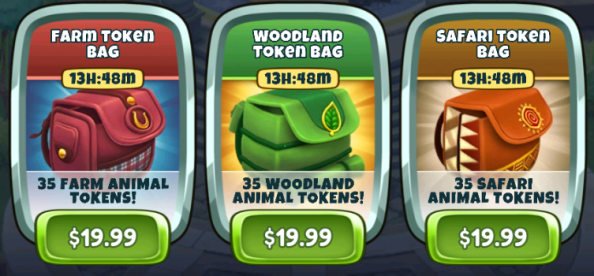
- There are set-specific Token Bags available for purchase that will ONLY give you tokens for Baby Animals in that set. This is a great way to increase your chances at getting a specific Baby Animal’s token; however, these bags are also randomized. They do not guarantee you will get the exact tokens that you need to increase your star power and unlock more levels of the Baby Animal Challenge.
Mythical Baby Animals
Meet Twinkle Star, our first Mythical Baby Animal!

Pretty cute right?
To unlock Twinkle Star, you can only earn tokens through the Baby Animal Challenge. Mythical Baby Animals will NOT appear in the Baby Animal Rescue Events. To power up these Mythical Baby Animals, you’ll need to earn a certain number of tokens AND rainbow crystals, a special new currency that you also earn by completing Baby Animal Challenge levels.
Phew! There are a lot of new aspects to the Baby Animal system and we hope that this makes things a bit clearer for you. What part of the new update are you most excited about?
The Spiral is a magical place with Wizard City at the center of all the worlds that are or could be. But, the Spiral had to come from somewhere. Who conjured Merle Ambrose? How did Ravenwood School come to be? What evil genius summoned the diabolical Malistaire and Morganthe? It all began with an idea, but that idea was brought to life by our talented KingsIsle team.
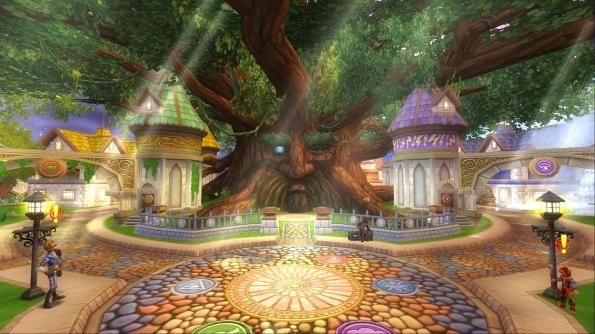
In the last KI Live, we brought in some members who have been with the team throughout Wizard101’s development to reminisce about their favorite moments and to reveal some interesting development trivia. To celebrate our 10th anniversary, we’re updating and expanding this post to bring you 10 things that you might not know about the creation of Wizard101!
-
It started out as a real card game
Believe it or not, the premise behind the game didn’t magically appear. The team spent a long time physically playing with a deck of character cards, some dice, and beads that symbolized the power-up and other boosts. They scribbled down rules, ideas, and notes about what worked and didn’t. They knew that the core of any good game, no matter how amazing the graphics and effects, is that it is fun to play. Fun fact: our design team still uses this strategy today for designing new mini games! You can see more in this video:
-
Wizard101 Wasn’t meant to fit in with other MMOs
When the heroes mentioned above came together, they thought about all the other games out there, like World of Warcraft, and realized there were not many games designed for parents and kids to play together. Quests in most MMOs are filled with violent battles and weapons that are not appropriate for children, so the creators wanted to come up with a game that was suitable for the whole family. In addition, the chat feature within the game is filtered to be safe for players of all ages.
-
Finding Nemo, Toy Story, and Wizard101
Turns out Pixar’s model played into the inspiration behind Wizard101. Like the team behind Pixar, the heads at KingsIsle wanted to create a world that would be engaging and safe for children, but still interesting and challenging for adults.

-
It was made in record time
The team of heroes had an ambitious goal: They wanted to launch their new game within three years, which is a pretty short video game development time in the gaming industry. By keeping the initial features compact and focused, they imagined, designed, tested and programmed the game on time!
-
Built with Grandma’s computer in mind
The creators realized that many kids and families don’t have the latest technology, so the game was meticulously designed to run well and look great on any system, even the older systems. The specs that this game requires were actually thought out with a purpose. The designers knew casual users without huge gaming rigs and kids on hand-me-down computers would be playing Wizard101, so the focus needed to be on the game being easily accessible and able to run on minimal RAM and processing power.
-
Wizard City’s design came from multiple concepts.
The team reached out to a variety of artists with the same ask: a floating city with a huge tree in the middle and a crystal incorporated somewhere within. Each artist came up with a unique piece of concept art, which we’ve compiled here:


There are details from each of these concepts that you’ll find in the final version of Wizard City. Which ones can you spot?
-
The First Worlds Were Built With “Lego Pieces”
When building the first worlds, the design team used a system referred to internally as “Lego pieces.” Worlds like Krokotopia and Marleybone were built using a series of straight, corner and T-shaped modular pieces that they could snap together. Grizzleheim was the first world built without the “Lego pieces” where all the maps were custom built.
-
The World Moves Around You
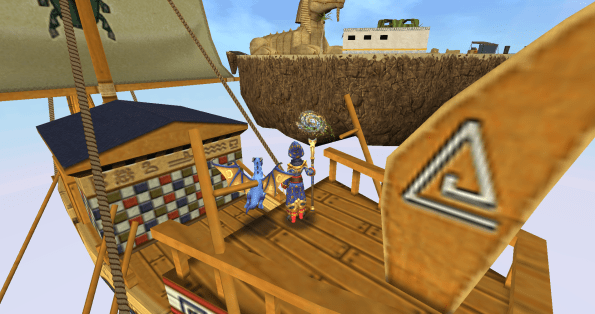
One landmark of Wizard101’s development was creating the boat ride in Krokotopia. The team wanted to give players the experience of being on a boat, being able to walk around on the boat, and actually seeing the world move as your boat moved. That task proved more difficult than expected, which led to a creative solution from the team. Instead of having the boat move, they kept the boat stationary and instead animated the world around the boat to simulate movement. You can see a similar effect with the balloon cars of Marleybone and the dragon ride in Dragonspyre!
-
Celestia Was the Biggest, Most Ambitious World (At the Time of Development)
Celestia’s introduced a new type of magic, 27 large zones, a ton of gameplay hours, and a high level of difficulty that was eventually adjusted. The most ambitious part of building Celestia was creating underwater tech like light refracting and swimming mechanics.
-
You Can Hear KingsIsle Employee Voices In-Game
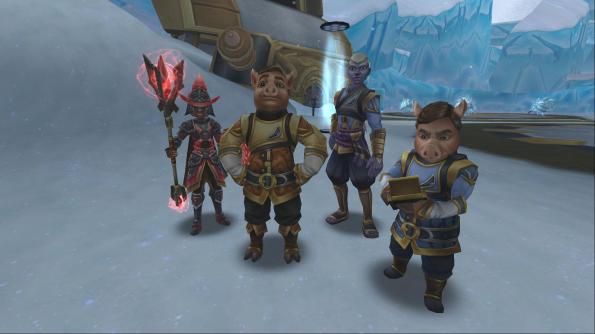
KingsIsle doesn’t just bring in the pros for voice acting. While many of our main characters are voiced by professional voice actors, our sound department will often ask KingsIsle employees to voice background and smaller characters. Sometimes they even let us voice main characters! Mike Sears, a Senior Narrative Game Designer, voices a LOT of characters including Sparck, Empyrea’s highly logical Science Officer!
Wizard101 is constantly evolving, bringing about new spells, characters, and technology. The creators of the game frequently refer to it as the best project they’ve ever worked on, and you can see why!
Were you surprised by any of these facts? Let us know in the comments section below!


 KingsIsle Blog