We are so excited about reaching 50 Million players, that we created an infographic to share some fun stats with you all! Ever wondered how much gold is in the Spiral? Now you know! Learn this and more with this celebratory 50 million player infographic!

So Wizards and Pirates, what fact are you most surprised by?
If you’re a Wizard101 player, why not bring the magic to life and have a Wizard birthday party of your own? You can cast all sorts of spells with fun games, delicious treats, and captivating decor that will transport all of your friends into the mystical world of the Spiral. If you like the sound of this, here are 10 quick ways you and your parents can help make your birthday party memorable and magical:
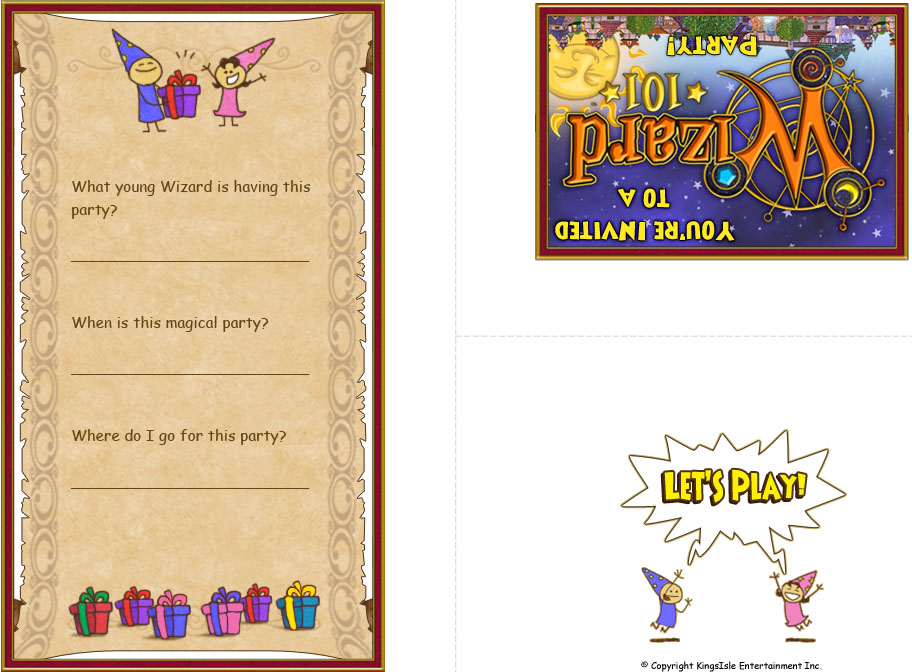
1. Let your guests know about your Wizard birthday in your very own Wizard City with a unique party invitation. We have a Wizard101 printout invitation for you to use, or you can create your own for added flair.
2. Next up is decor! Decorate your castle by hanging a banner that says “Welcome to Wizard City” by your front door and adding mystical looking knickknacks like stars, moons, dragons, and more around your party area to set the scene.
3. To get the party started, set up a Wizard hat-making table for you and your guests. Your hats can be unique to you or replicas of those worn by Wizard characters like Merle Ambrose or Lydia Greyrose. Whatever you decide, Wizard hats are a fun and simple way to get your friends into their proper Wizard characters. Simply cut some 24″x18″ paper using this template. After cutting out the hat, use construction paper to make stars and moons to stick on as decorations. Other fun additions include glitter, beads, and sequins.
4. For food, the most important part is the cake, of course! Your cake must match the magical energy of the party and you can make this happen by customizing it with the symbols and colors of your favorite school of magic or even featuring your favorite piece of gear.

5. Another fun addition to your food selection could be health and mana cookies to keep energy levels high! Bake sugar cookies and coat them in red or blue icing to match the elements of the game. Another yummy option is pretzel rods dipped in white frosting and coated with sprinkles to make edible magic wands. Casting a spell has never been more delicious!
6. If you want the drinks at the party to seem more exciting, don’t just serve them, set up a potion-brewing station. Before everyone arrives, fill ice cube trays with different-colored juices or Gatorade. Once all Wizards are in attendance, serve clear drinks like lemon-lime or cream soda and add the colorful ice cubes. The drinks will magically change color as the cubes melt, creating a fun potion drink!
7. A treasure or scavenger hunt is a great way to turn the game into real life at a Wizard101 birthday party. Send younger kids on an Easter Egg-esque treasure hunt for “gems” by simply painting small rocks with nail polish and hiding these as appropriate.
8. For older kids, a scavenger hunt that uses Wizard101 clues would be a great idea. Finding relics from Krokotopia, seeking out powerful spell cards, or even finding books about the inspiration for Wizard101’s settings and creatures can all be fun and engaging ways to bring the game into the real world.
9. Prepare small bags of treats and toys to hand out to your guests. A token from your Wizard101 birthday party will help make sure people at the party don’t forget the spell you cast! Fun souvenirs include chocolate gold coins, crowns, or dragon figurines.

10. Lastly, once everything is cleaned up and all the cake is eaten, remember to send out thank-you notes to the people who came and helped make your party magical!
It takes a lot of work to have a Wizard birthday party so also remember to thank your parents and anyone else who helped make it happen. Most of all, have fun!
Online play options have become standard for many PC games and parents naturally want to find safe online games for their kids. While your kids play with other players of their favorite games, you need to be watchful for any potential problems. By taking proactive steps and staying actively involved in your children’s online activities, parents like you can ensure safe online gaming for your kids.
Observation
As a parent, you need to stay current on game ratings and your kids’ use of and involvement in these games. Game ratings can help parents determine what is and is not acceptable content for their kids’ age groups and maturity levels. Here is a breakdown of some of the common game ratings from the Entertainment Software Rating Board (ESRB):
- E – everyone
- E 10+ – anyone over 10 years old
- Teen – some content is not kid-friendly
- M – mature players, usually 17+
- A – adults only due to graphic content
- RP – rating pending/undetermined
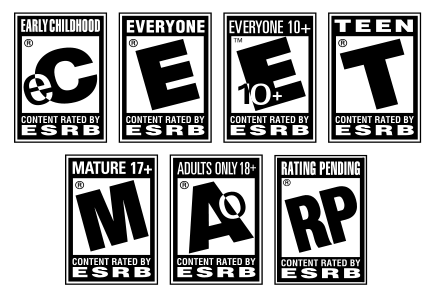
To learn more about what constitutes each ESRB rating, please visit here.
Communication
Make sure you keep communication lines open with your kids. They need to know that they can come to you with questions, concerns, or problems about the online games they play. Parents who are involved, approachable, and take an interest in what their children are doing often have kids who stay safe and smart when playing online. Here are a few tips to get your children talking:
- Ask them about the game they’re playing
- See if they will show you what the game is like
- Ask them about their favorite characters in the game
- Talk to them about the people they play with
- Find out what they like and dislike about the game
- Offer to play the game with your children
Involvement

Being involved will go a long way in helping to protect your kids in the online gaming world. Sit beside them, take an interest in what they are doing, and engage with them as they play the game. This is a great way to take an active role in promoting online safety, even if online games are not really your thing.
Tips to Promote Online Safety for Kids
Make sure your children do the following to stay safe online:
- Use strong passwords for online game accounts.
- Never share passwords or accounts with other players online
- Know how to report unacceptable behavior.
- Never share names, age, addresses, phone numbers, school names, or other personal info online.
- Avoid using real names for screen names
- Do not use real photos of themselves as their user images – adopt avatars or generic image instead.
- Only discuss game-related things during in-game chats or communications.
Make sure that as a parent you are engaging with your kids, encouraging them to take part in activities in real life as well as online, getting them to do things with you as a family, and highlighting the importance of spending time away from games and the Internet. You do not have to stand over their shoulders all the time, but being involved, interested, and influential in what they do with their time can help keep them safe when playing online games. Using these and many other safety tips for online game play can go a long way in helping kids make smart decisions as they play games and interact with other players online.

For the seventh year, thousands of gamers from all over the world have come together to play games for 24 hours to raise money for Children’s Miracle Network hospitals. Extra Life is one of the most popular gaming-themed charity events held each year. As one of the premiere charities helping sick and injured children, the impact made by Children’s Miracle Network cannot be underestimated.
62 children enter a Children’s Miracle Network Hospital for treatment every minute. Whether they suffer from common childhood afflictions like asthma and broken bones, or fight bigger challenges like birth defects or cancer, Children’s Miracle Network Hospitals provide comfort, treatment and hope to millions of sick kids. In fact, Children’s Miracle Network Hospitals treat one in 10 children in North America each year.
This year for the first time, KingsIsle lead a team of Wizard101 and Pirate101 players (and KingsIsle employees too) for this amazing cause. Players from around the Spiral signed up to join KI Gamers and play 24 hours of games for this fundraising marathon. October 25th was the big game day, and team KI Gamers was out in full force. Many Wizard101 community leaders and fan site owners including Steve and Christina from Spiral Radio 101, Kelsey Fireheart from Stars in the Spiral, Paige Moonshade from Paige’s Page and Alura from Art in the Spiral took part in the event and helped us to exceed our goal!
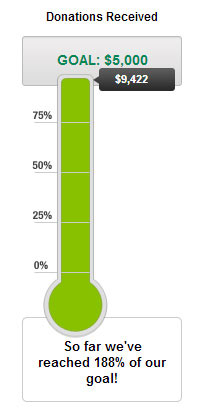
Our original goal was to raise $1000 but with the amazing efforts of our team, we raised the goal to $5000 and just kept going from there. At final count, the KI Gamers team had 322 members who raised a combined total of $9,422 for their local Children’s Miracle Network hospitals. Members of the KI Gamers team who raised over $100 even got to be some of the first players in Wizard101 to have the brand new Mystic Fishing Bundle!
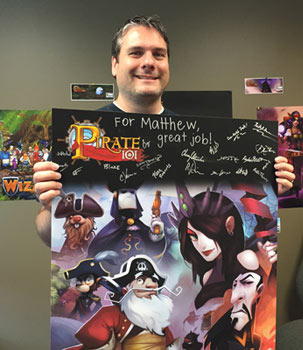
Matthew, the KI Gamers team top earner, raised $586 for Extra Life! He went above and beyond to help kids, and I knew we had to do something extra special to thank him. So we are sending Matthew a signed poster from our team at KingsIsle. Great job!
By the end of the day on October 25th, the entire Extra Life community raised over $5,515,074 to help improve the lives of sick children through Children’s Miracle Network. I am endlessly proud of not only the KingsIsle community, but the gaming community as a whole for showing the best of ourselves through Extra Life.
-Leala aka Professor Greyrose

Halloween is getting closer and closer! Today we have another great KingsIsle costume idea for you crafty Pirates. Dress up as Madame Vadima this Halloween with these great ideas.
She gazes into her crystal ball and tells you what fortune lies ahead of you. She is mysterious and lovely, and her predictions, while confusing, always come true. You have long admired the flowing hair and colorful costume of Madame Vadima, the mystifying fortune teller on Pirate 101, and now you can dress like her. Here are six things you can pull out of your mom’s closet to dress like Madame Vadima.

Top – Check to see if your mom has a white top that is full and flowing. Try to find one that has a stretchy neckline so you can wear it off your shoulders – just like Madame Vadima!
Skirts – Madame Vadima wears a couple of skirts that are layered. In order to dress like her, you will need to do the same. Raid you mom’s closet and find a couple of long and flowing skirts. Bonus points if any of these are green! You will need another, lighter, shorter skirt to put over it – you want the green to show.
Make-Up – Your mom’s make up will be one of the most fun parts of dressing like Madame Vadima. Have your mom help you use dark eye shadow and eyeliner along with a dark purple lipstick to look just like the mysterious fortune teller.
Scarf – Truly get in the character of a fortune-teller with a scarf around your head, just the way Madame Vadima wears hers. You can also tie another one around your waist as a long, flowing sash.
Boots – One of the most important parts of Madame Vadima’s outfit is her heeled black pair of boots. If the boots you find are too big, stuff some socks in the toes and wear a pair of thick socks so they don’t slip too much.


 KingsIsle Blog